My Spring Break with Claude
Nine experiments in one week. Some skiing happened too.
It’s Spring Break 2026 and my family is in Aspen. I brought a new friend on the trip with me – Claude.
On the plane ride – I was already addicted to coding on Claude. By day two I was coding on the gondola. By day three I was coding at the top of the mountain. By day four my daughter stopped asking me what I was doing on the ski lift rides up the mountain – she was just shaking her head laughing.
I coded at lunch. I coded at dinner while pretending to read the wine list. I coded at midnight after everyone went to bed. I coded at 5am before anyone woke up. At one point my wife walked by, looked at my screen, and said “you know this is vacation, right?” I told her I was almost done. That would never happen (and I know now - perhaps ever in my life).
Here’s what happened: I’d stumbled into something I couldn’t put down. Sorta like a good book – but totally not. Over one week, I got hooked and ran nine completely different experiments with Anthropic’s Claude. I wanted to see if it could do real work – but I chose more ‘fun’ experiments to test out the underlying theories. Some of it worked incredibly well. Some of it failed in spectacular ways. This is that story.
My setup is:
- Devices: MacMini acting as a server, MacBook, iphone
- Software:
- Claude Desktop running on the MacMini
- Docker on PC + Claude Code CLI version + BUN - used for more complicated code writing that must tie back to GitHub, CI/CD, group projects with other developers
- Jump Desktop & Mobile app - remote desktop to MacMini so I can do all coding & interaction across devices (can do with Claude remote also - but easier to use remote desktop since using Claude Desktop locally installed as well as need to interact with local browser for MCP, local apps, etc)
- Other important components:
- Google Cloud Console - needed for Oauth/OTP for various connecting services (Google drive/docs, etc)
- Gmail account dedicated to Claude
- Github - for committing code back
- Quicken desktop - for secure financial transaction data
Claude has three modes. Chat is basic Q&A—commodity. CoWork controls your desktop and works with local files—great tool for specific use cases or non-technical users. Code writes and runs actual code, connects to APIs, scrapes the web, sends emails. Code is where I spent 99% of my week.
Experiment 1: Could AI help me build a perfect March Madness bracket?
(Boring reason for this experiment – test if AI could make a world-class prediction engine with deep data and history as baseline. Will be important on a variety of company use cases.)
To set context – a perfect bracket has NEVER been done. The odds are 1 and 9.22 quintillion. Yeah – to the 26th power. And even if you do have some basketball knowledge – it’s still 1 and 120 billion. Could AI do it?
I had AI go out and analyze the last 10 years of March Madness tournament data. I told it to study every game played, I told it to study the great predictors of our time, I told it to integrate KenPom ratings, ESPN analytics, and Vegas betting lines. I had it generate a bracket with a detailed rationale for every single pick. I felt pretty good about it.
My AI bracket is currently 29th out of 48 – terrible.
Both my wife and my 17-year-old daughter are crushing me. They used no AI. They used no data. I’m pretty sure my daughter picked some teams based on the mascot. I used ten years of data and four analytical models. She just liked a Husky.
Turns out – predicting the impossible isn’t quite AI’s thing. But my overconfidence with my family on my bracket will probably never be let go.
Let’s talk about what actually worked.
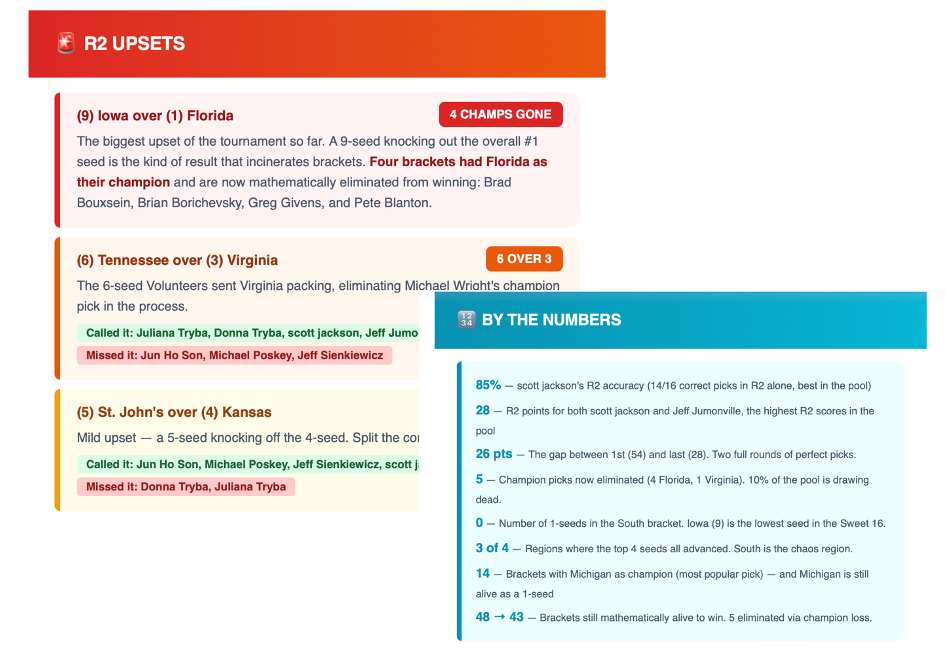
I connected Claude to our CBS Sports pool. I normally send out emails after every round to our 48 participants this year. It’s a pain to pull together.
Claude, after each round, auto-analyzes all 48 brackets, calculates standings, identifies upsets, and sends a formatted email to every participant. Zero touch from me. Everyone loves the emails. So at least the part I didn’t ask the AI to predict is going well.
Setup: Claude Code for modeling. All 48 bracket entries scraped upfront. Chrome MCP for live scores. Automated email system. Key learning: Claude gets lazy with large datasets and has to be pushed to do the actual math.
Company application (that will work): Customer Success—automating a 360 view of customers based on their usage data & external data to send to CSMs weekly with deep insights on customers to aid in their retention and upsell/cross-sell. Prediction is a ways off yet - but perhaps could be used to try to anticipate go-live dates, product launch date readiness, etc. Those predictions are less variable than March Madness.
Experiment 2: Could AI build a Virtual Assistant to help find best flights, hotels, events, restaurants?
(Boring reason for this experiment – test if AI could pull together real-time recommendations based on input data set and changing external data.)
To do this experiment – I had to first build a suite of specialized “skills”: flight search, hotel search, restaurant search, event finder, airport lounge finder, itinerary builder, weather, and airport logistics. Also had to build an email engine and setup Claude with a dedicated Gmail – setup a chron job to check it and return an auto-response then a nicely formatted HTML response.
The early results were terrible. Turns out that all these fancy websites like Kayak and Hotels.com pay a ton of money to companies that sell APIs with the real time info (OpenTable, Amadeus flights, etc). I didn’t want to pay for those APIs – but Claude would simply give me generic info without it.
But I kept at it. Dozens of iterations per skill. And eventually it got really good. That’s kind of the whole story with Claude—the first attempt is often bad, but if you put in the work, the final product is worth it. The key was to ensure you forced it to use Chrome MCP to ‘scrape’ data from the various websites and do the searches as if you were on the browser. AI doesn’t like doing it the ‘human way’ – but that’s the only way I found to get the real-time info without paying.
Now – this virtual assistant is almost a product by itself. If I ever want to change careers and become a travel agent – Claude is my first hire.
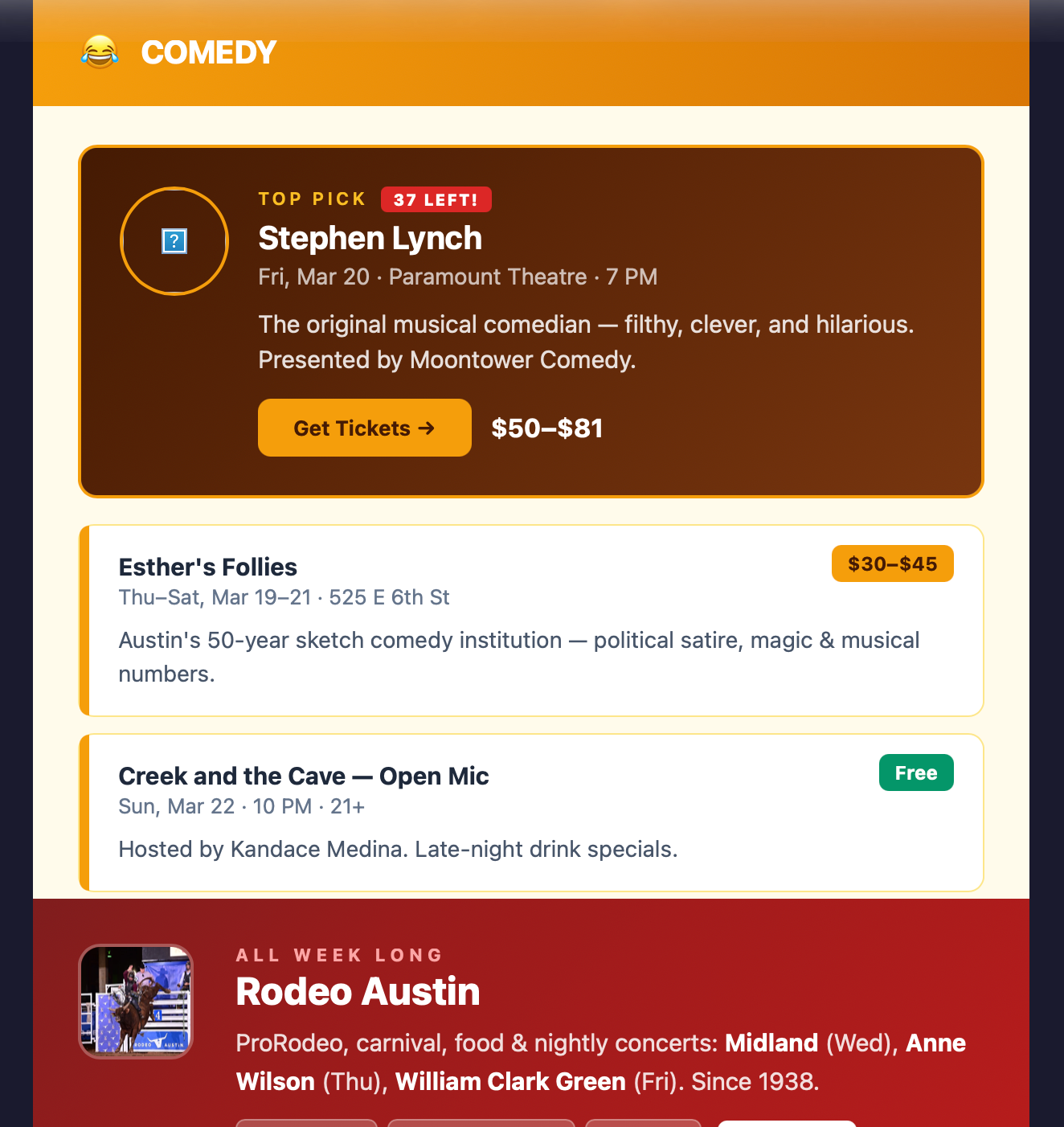
I also have it setup now to automatically send my wife and I an email of various events occurring in Austin this week as well as upcoming. Great easy use case that can make up for some of the credits I lost due to less ski time with the family.
Setup: Google Cloud Console for Oauth, dedicated Gmail, Chrome MCP for web scraping, Claude Code for each skill. Each skill took dozens of hours to refine.
Company application: HR – we should productize an internal virtual travel assistant for all employees. Will save tons of time/money for folks going on customer visits, F2Fs, etc.
Experiment 3: Could AI categorize my family’s weekly spend against our budget?
(Boring reason for this experiment – if we can automate company financial reporting work to a simple AI weekly report – this will provide tons of value to the finance team, leadership and the Board.)
To build this – one criteria I had was to ensure I didn’t upload my bank info to Claude or directly connect it to my bank account credentials (via Plaid). I don’t quite trust AI enough for any of that yet.
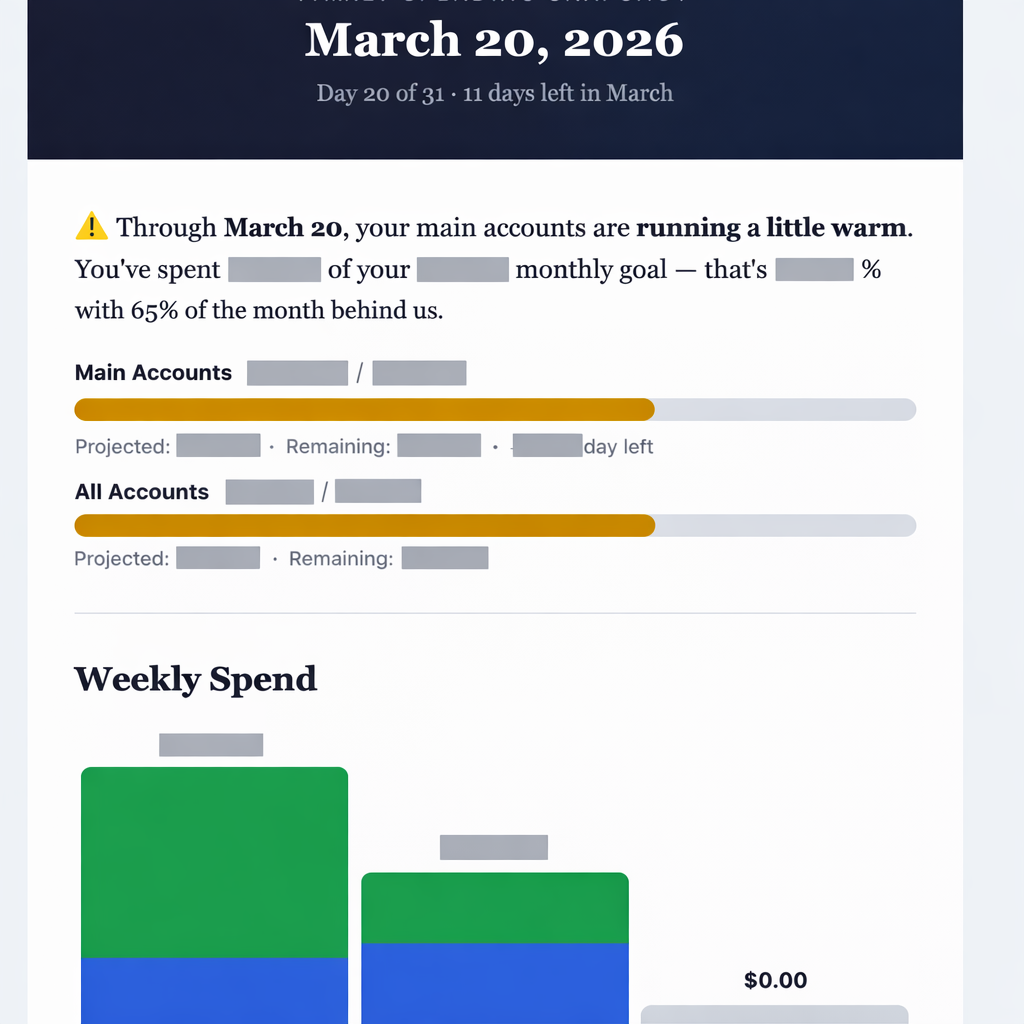
But to do a fully automated weekly spending analysis – I needed to create a bit of a Frankenstein. I downloaded Quicken Desktop to have it connect to my bank and download weekly transactions, I have Apple Automate automating that task weekly, Claude then reads the transactions via Quicken’s local SQLite database, categorizes everything, calculates budget burn rates, identifies top transactions, and emails a formatted report. Zero touch – and only the transaction data makes it to Claude.
My wife now receives a beautifully formatted spending report every week. I didn’t fully think through how that would land. Turns out your wife doesn’t love getting automated budget alerts from a robot with your last name. She asked me to turn it off. I said it was for science. We’re still working through that.
Setup: Quicken Desktop as privacy firewall. Apple Automations for Quicken refresh. Google Cloud OAuth for email.
Company application: Finance & FP&A—automated weekly dashboards from raw data. Board-ready insights. The pattern works for any data source.
Experiment 4: Could I really push production code into a live product?
(Boring reason for this experiment – everyone talks about how AI will change the software developer role – but opportunity is well beyond that to extend ‘software development’ to more roles across the company to accelerate innovation.)
The last time I wrote code, it was in college (btw – pre-internet. Yes – Dewey Decimal system and all). I don’t fully remember what languages I coded in – but think it may have been Fortran or COBOL. I just know I wrote it, and then I stopped, and that was probably the right decision for everyone involved.
So naturally I thought, “I should totally go fix bugs in a production React Native app.”
We connected my Claude Code to the full VerseMate codebase (VerseMate is a non-profit Bible app that a few volunteers and I are working on). This took some deeper technical work – loading Docker on my desktop, loading Claude CLI, loading BUN, loading Github SSH credentials, loading Claude remote to connect Claude CLI in Docker to talk to my Claude Desktop, loaded Xcode on my desktop to build and validate, etc. But after all that was set up (~10 mins) – magic started to happen.
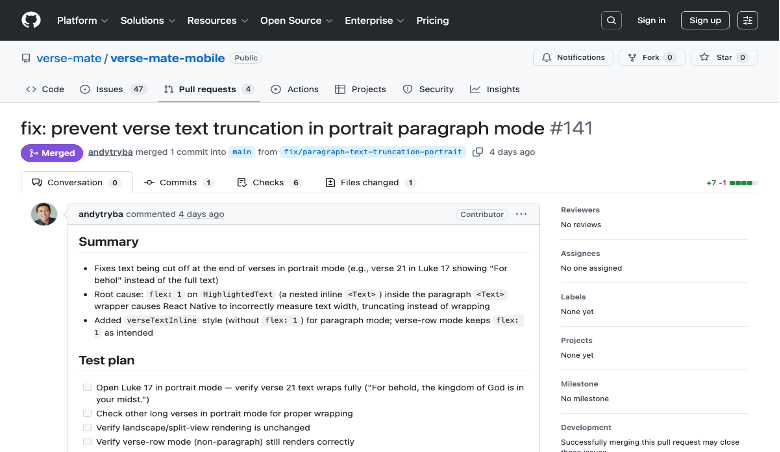
I was actually able to do a ton of dev work. I fixed multiple bugs end-to-end! Pulled from the bug list, had Claude fix and validated locally, did a Git commit, CI/CD ran on that and passed build and the PR was approved! This one bug appeared in 150 places; Claude found and fixed all 150. Success!
I also built a Slack-to-GitHub actions bot, cleaned up stale tickets in Github by reviewing old release notes.
I’m clearly a junior developer – and more complex fixes are clearly out of my league. But I shipped production React Native code. Me. The COBOL guy.
Setup: Docker container + BUN runtime + Claude CLI + GitHub SSH keys + full source code. A developer helped with the initial environment (10 mins). Will become a standardized VM setup for all devs.
Company application: Engineering—all engineers need the same Dockerized VM setup with Claude writing first-draft code then the devs refine. Product—PMs to use Claude + Figma to go well beyond writing specs and move to providing initial code+UI. Support—L3 engineer with Claude Code to solve majority of escalated tickets and submit PRs.
Experiment 5: Can AI create the world’s best high-school college admissions counselor?
(Boring reason for this experiment – can you integrate AI into a ‘product’ and have it provide very deep insights/recommendations based on internal product data & external data sources. This is critical for all of our future roadmaps.)
Like many other parents - we hired a college counselor for my daughter. It was SUPER expensive. I’m embarrassed to say how much - but this experiment was partly motivated by wanting to feel better about that decision. The exact opposite happened.
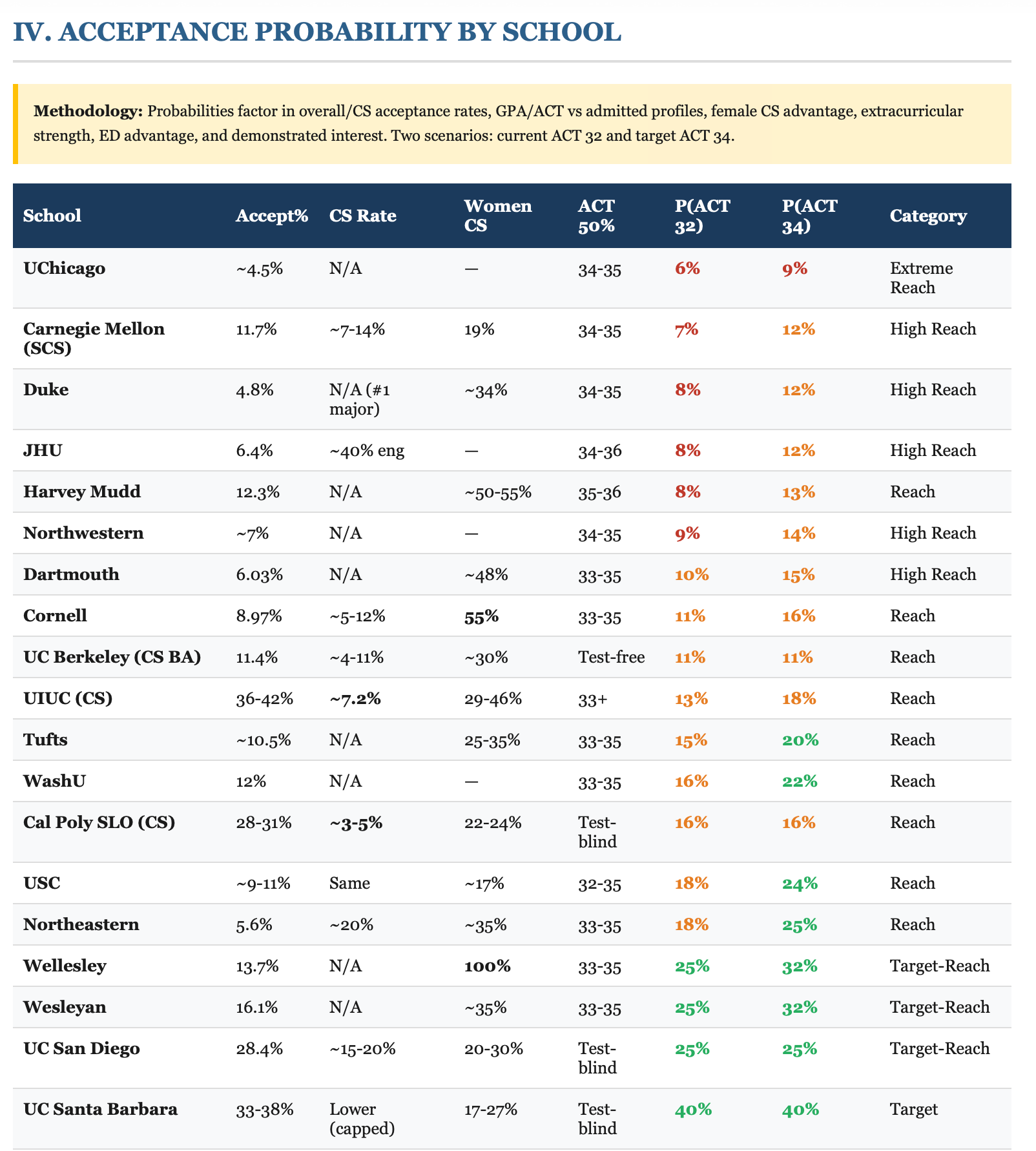
I fed Claude my daughter’s complete student profile—transcripts, AP test scores, ACT/SAT scores, summer internships, high school class list, extracurriculars, target schools and desired majors, student narrative —and asked for a comprehensive analysis. It produced a 25-page report: acceptance probability for every target school, ACT/SAT superscore analysis, coursework evaluation, ED/EA strategy, additional schools it recommended on its own, and a month-by-month action plan.
It blew me away. It was honestly WAY more thorough than what we paid for. I showed it to my wife. She looked at me. She looked at the report. She said, “So we could’ve had this AND stayed in budget.” Which stung because the budget experiment was still fresh.
Setup: Student documents in Google Drive + Claude Code with Drive API access. No special configuration. Just good data.
Company application: Product – need to start integrating AI analysis within the workflow of the product utilizing internal data & external sources.
Experiment 6: Could I feed 66 hours of meeting transcriptions into Claude and have it produce insights?
(Boring reason for this experiment – meetings occur ALL DAY LONG across all companies. AI note taking it great – but nobody reads them. If there is a better way to gather insights from the transcripts across the division or company – we should utilize that data to enhance collaboration.)
For this experiment – I analyzed 66 Zoom transcripts, each 2–2.5 hours long, from my Bible study. Fortunately – all those Zoom transcripts were saved on a Dropbox along with the videos. I didn’t think much would come out of analyzing these – but it was the richest data volume of meetings I had access to.
Then magic happened - Claude identified teaching patterns, discussion dynamics, recurring themes, participation trends, and rhetorical techniques. It used not only the text – but also the audio to detect tone, how things were said, etc. It also enabled a “chat against the data” mode—ask any question across all 66 sessions, get instant cited answers. It basically took unreadable text files and made them come alive – awesome.
Setup: A Dropbox folder with 66 text files. Claude Code. That’s it. Lowest-setup, highest-return experiment of the week.
Company application: HR – if we can feed team/divisional meeting transcripts into a data lake. Anyone can chat against it to catch up, find decisions, or locate that thing someone said three months ago. Massively untapped and powerful tool that is 100x better than looking at AI summaries or even worse – trying to watch hours of video.
Experiment 7: Could I develop an AI-Powered Leadership Coach?
(Boring reason for this experiment – leadership coaching today is very ‘data-light’. If AI could pull real data from a leader’s team meetings, town halls, key deliverables, etc – then coaching could be 100x more insightful based on real leader data.)
This experiment was an extension of the 66 transcript one. But rather than just looking at the meeting – I pointed it to the Bible leader. Could I analyze his style vs others in the industry? Could we scale this type of coaching to make Bible study leaders more effective?
I should just say this upfront: using artificial intelligence to help Bible study leaders get better at helping people get closer to God is definitely not a use case that most think of. I don’t think that’s what anyone at Anthropic had in mind when they built this thing. But it worked amazingly well.
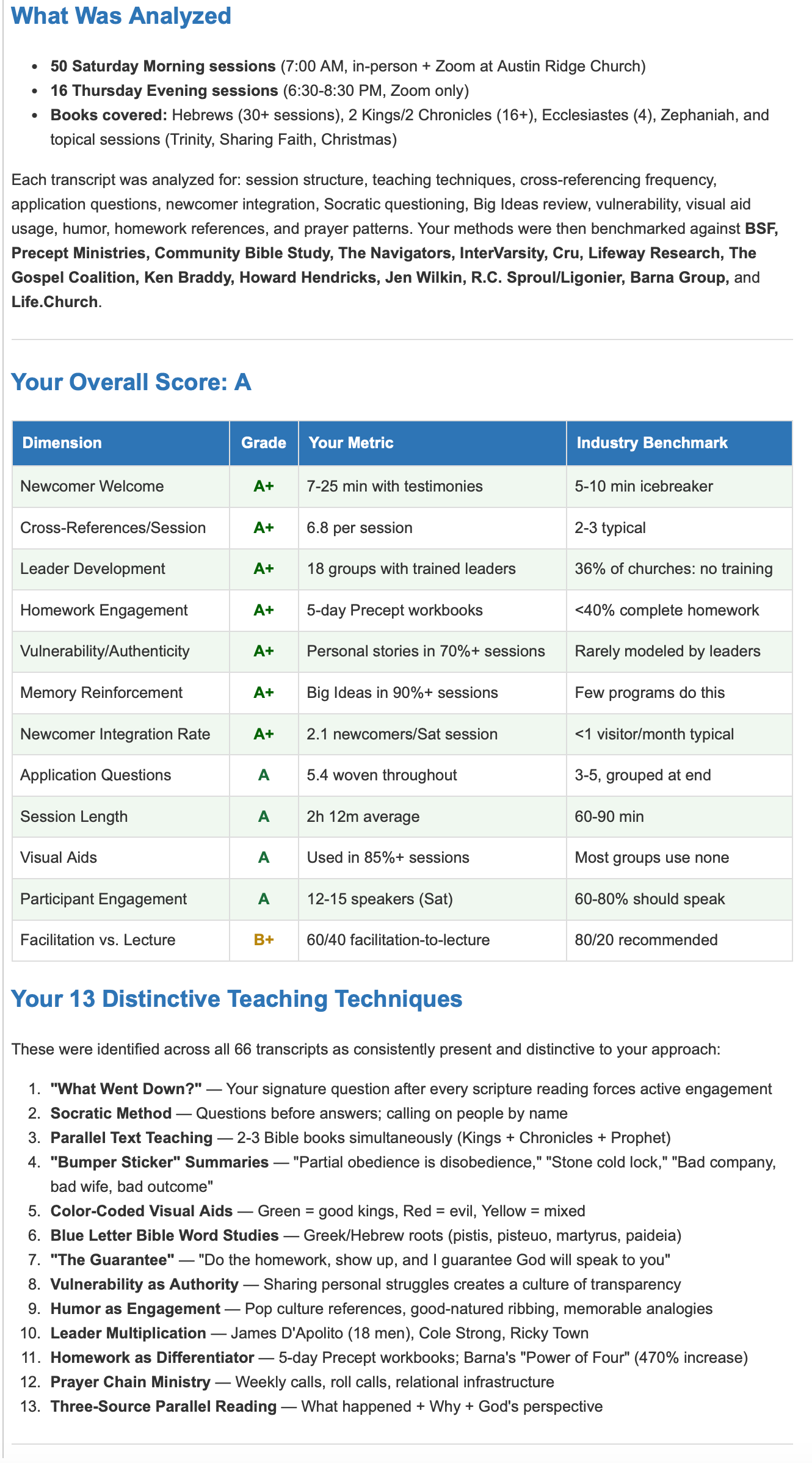
I fed 66 transcripts and 16 video recordings of a senior Bible study leader into Claude. I had it analyze him vs industry methods, questioning techniques, and facilitation style, then benchmarked against 14 established organizations. It produced a magical report on where he shines, areas to improve, etc. It also produced a template to be able to coach others.
I then applied this template to a junior leader’s session for a detailed development plan. The 12-dimension scorecard it produced was more thorough than anything a human coach would create. Amazing
Company application: HR & leadership development—analyze how managers lead by mining meeting transcripts. Data-driven coaching at scale.
Experiment 8: Could I get automated competitive intelligence?
(Boring reason for this experiment – if we could automatically arm CSMs, product guys, marketing, sales, leadership and others with great synthesized competitive intelligence – this would make our companies better.)
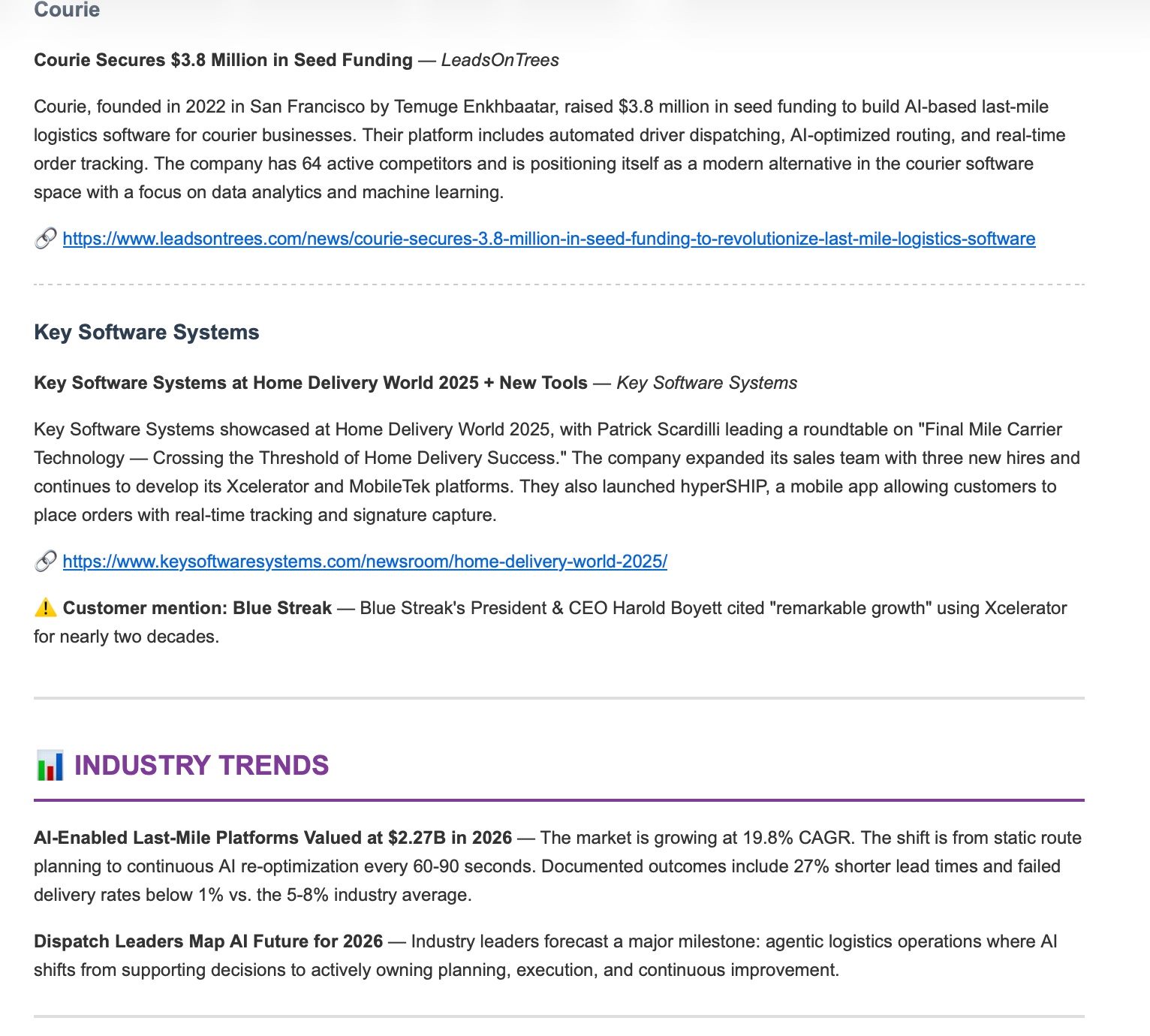
This was probably the easiest of all experiments. I configured Claude with competitor names and industry topics. Weekly, it searches for news, product announcements, funding rounds, and customer wins, then summarizes everything into a formatted email.
Sorta boring – but massively useful and not done across our companies today.
Company application: Product/CS/Sales—weekly competitor digest. CS—customer news monitoring. Marketing—automated trend tracking.
Experiment 9: Tech Support
(Boring reason for this experiment – if we can internally enable folks to solve their own IT problems – it helps drive security compliance, reduced IT load, etc.)
I’m the guy who pings IT about stuff that’s probably in 50 FAQs somewhere. I can feel them not wanting to help me. They’re very polite about it. But I can feel it.
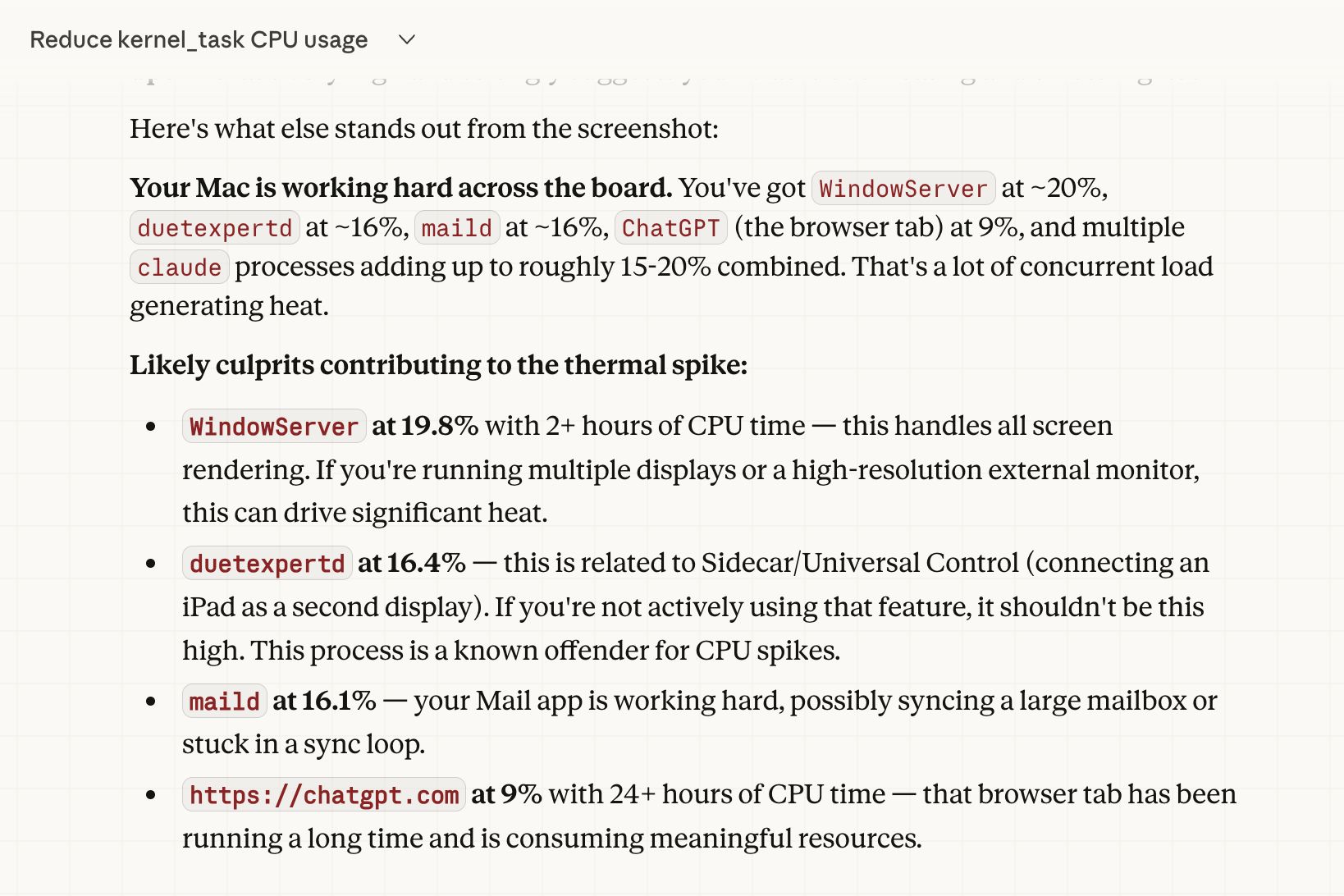
I unleashed Claude CoWork on everything I’d been procrastinating on: optimize CPU/memory, configure Mac Mini as a server, mass-unsubscribe from marketing emails, clean up my Downloads folder (3 years, 47GB), set up remote desktop, configure Docker, create scheduled tasks. Mac Mini: sluggish to snappy. Inbox: 500 marketing emails a week to near zero.
I will never call IT support again for these kinds of questions. They’re going to be so relieved.
Company application: IT—standard-issue on every machine. Before calling helpdesk, go to CoWork first.
What This All Means
After one week of obsessive experimentation, I’m convinced: Claude is now powerful enough for a wide variety of real-world tasks. Not toy tasks. Not demos. Real work that saves real time and produces real results.
People who learn this tool get genuine superpowers. The college recommendation was more thorough than our paid advisor. The virtual assistant is amazing. The transcript analysis found patterns across 66 hours that no person could. The competitive intelligence runs 24/7 without anyone touching it.
This is truly game-changing—not just for productivity, but for what’s possible. It’s something we need to infuse throughout all of our companies. Not as a nice-to-have. As a core competency.
Where to apply it
Engineering Claude writes first-draft code, developers refine
Product Claude + Figma for UI specs and code demos
Finance Automated weekly dashboards and Board-ready insights
Customer Success 360° customer health with churn scoring
Sales Weekly competitive intelligence digests
HR Data-driven coaching from meeting transcripts
Prof. Services Accelerated implementations via data QA
IT Claude CoWork on every machine before helpdesk
Everyone CoWork for daily productivity—non-optional skill
A few practical notes
Claude Max ($100/month) is the minimum token tier for real work. Security needs thought since Claude runs background actions and most people will just click “Approve.” Training matters—handing someone a license without use cases is like handing them Excel in 1995.
One more note about Claude can be super lazy. Sometimes super frustrating. It is a long long way away from being ‘autonomous’ – but the innovation curve is amazing. And it will get there. But for now – everyone needs to learn it and this will be a core focus of EVERYTHING moving forward.
Now if you’ll excuse me, I need to check my March Madness bracket.